 GainsLog
How to Choose the Best Workout Log App for iOS or Android
Fast logging and last-session numbers decide whether you keep using an app. Active maintenance and honest data access decide whether it's still there for you in five years. Everything else is preference.
Table of Contents
- Is Logging Fast Enough to Do Between Sets?
- Does It Show You What You Did Last Time?
- Is It Actually Being Maintained?
- Does It Work on Both iOS and Android?
- Is the Free Tier Real, or a Trial Disguised?
- Does It Guide Your Next Session, or Just Record the Last One?
- Can You Get Your Data Back Out?
- Is It Cluttered with Things You Didn't Ask for?
- How GainsLog Answers These Questions
Every workout log app claims to be the best, and most of them have the screenshots to prove it. Tidy progress charts, plate-loading calculators, social feeds full of people who look like they've never missed a leg day. It's easy to pick the one that markets best.
The problem is that most people don't stick with the app they pick. Not because the apps are broken, but because the features the screenshots sell aren't the features that determine whether you use a log week after week. I've been building one of these apps for a while, so take the bias warning seriously. But the questions below are the ones worth asking before you commit your training history to anything, and they apply on both iOS and Android.
Is Logging Fast Enough to Do Between Sets?
This is the one that decides everything, and almost nobody checks it before downloading. You open a workout log dozens of times per session, standing at a rack with sixty seconds of rest. If logging a set takes more than a couple of taps, you'll stop doing it. Not on day one. By week three.
Download the finalists and log a fake set in each one. Count the taps. The app that feels fastest in your hand is the one you'll still be using next year, regardless of what else it does.
Does It Show You What You Did Last Time?
The whole point of tracking is to do a little more than last time. That only works if the app puts last session's weight and reps in front of you before you start the set, not buried three screens deep in a history view.
Open the logging screen and check: can you see what you did last week without navigating away? If you have to go hunting for the number, the app is making the most important part of training harder than it needs to be.
This is also where the 'just use a notebook' argument quietly fails. A notebook records what you did. It doesn't put the number in front of you, and it doesn't tell you what to chase next. A good app does both.
Is It Actually Being Maintained?
Check the update history in the app store. An app that ships regular updates has someone behind it who's still invested. One that hasn't been touched in a year or two slowly breaks as phones and operating systems move on, and your data goes with it.
A workout log is only useful if it's still around in five years holding your history. Longevity matters more than any single feature, because the rest of what you like about an app only works if it stays alive.
Does It Work on Both iOS and Android?
Few workout trackers are genuinely good on both platforms. Many are built once and wrapped for the other one, and they tend to feel slightly off on at least one side.
It matters if you might switch phones down the line, or if you want to share a routine with a training partner on the other platform. Before you pick, check that the version for the phone you'll actually use gets the same treatment as the one in the ads.
Is the Free Tier Real, or a Trial Disguised?
A lot of apps advertise a free version that turns out to be a demo. A hard cap on routines, a limit on saved exercises, or a paywall on the one feature you actually need. You usually find out a week or two in, after you've started logging and the switching cost has gone up.
Before you invest months of history anywhere, check what the free tier actually gives you. Some popular trackers cap free users at three or four routines. Others keep the core logging loop fully free and charge only for programs and advanced analytics.
There's nothing wrong with paying for a good app. But pay because the free tier earned it, not because you're being held hostage by the history you already logged.
Does It Guide Your Next Session, or Just Record the Last One?
The best trackers don't just record what happened. They turn that record into direction. Logging sets is note-taking. Logging sets and being told exactly what to chase next session is training.
The feature to look for is adaptive progression: after each session, the app evaluates what you lifted and sets targets for the next one. Hit your rep target, the weight goes up. Miss it, you keep the load and push for more reps. That loop is what separates a digital notebook from a training partner.
A tracker with unlimited routines but no progression guidance is a fancy notebook. That's a legitimate choice if all you want is a record. But if you want the app to help you progress, the progression system matters more than the exercise database.
Can You Get Your Data Back Out?
Your training history is yours, and it's valuable. A good app keeps it accessible: synced to the cloud so it isn't trapped on a single phone, and exportable if you ever want to leave.
Before you commit years to an app, check how easily your history moves with you. Some apps only export through support tickets. Some don't export at all. That's not a convenience question, it's a lock-in question, and it's worth answering before you're the one being locked in.
Is It Cluttered with Things You Didn't Ask for?
You need exercise, weight, sets, reps, and ideally your personal records and progress over time. That's most of what matters. Some apps pile on body-measurement trackers, macro counters, social feeds, and AI coaches until the core job of logging a set gets slow and fiddly.
Decide whether you want a focused logger or an everything-app, and pick accordingly. Both are legitimate. What's not legitimate is an everything-app that makes the logging itself worse, because the logging is the part you'll touch forty times per session.
How GainsLog Answers These Questions
I'm biased here, and I should be upfront about it. I built GainsLog, so I'm the last person to give an impartial verdict. But I built it around exactly these questions, so it's fair to be explicit about where it lands.
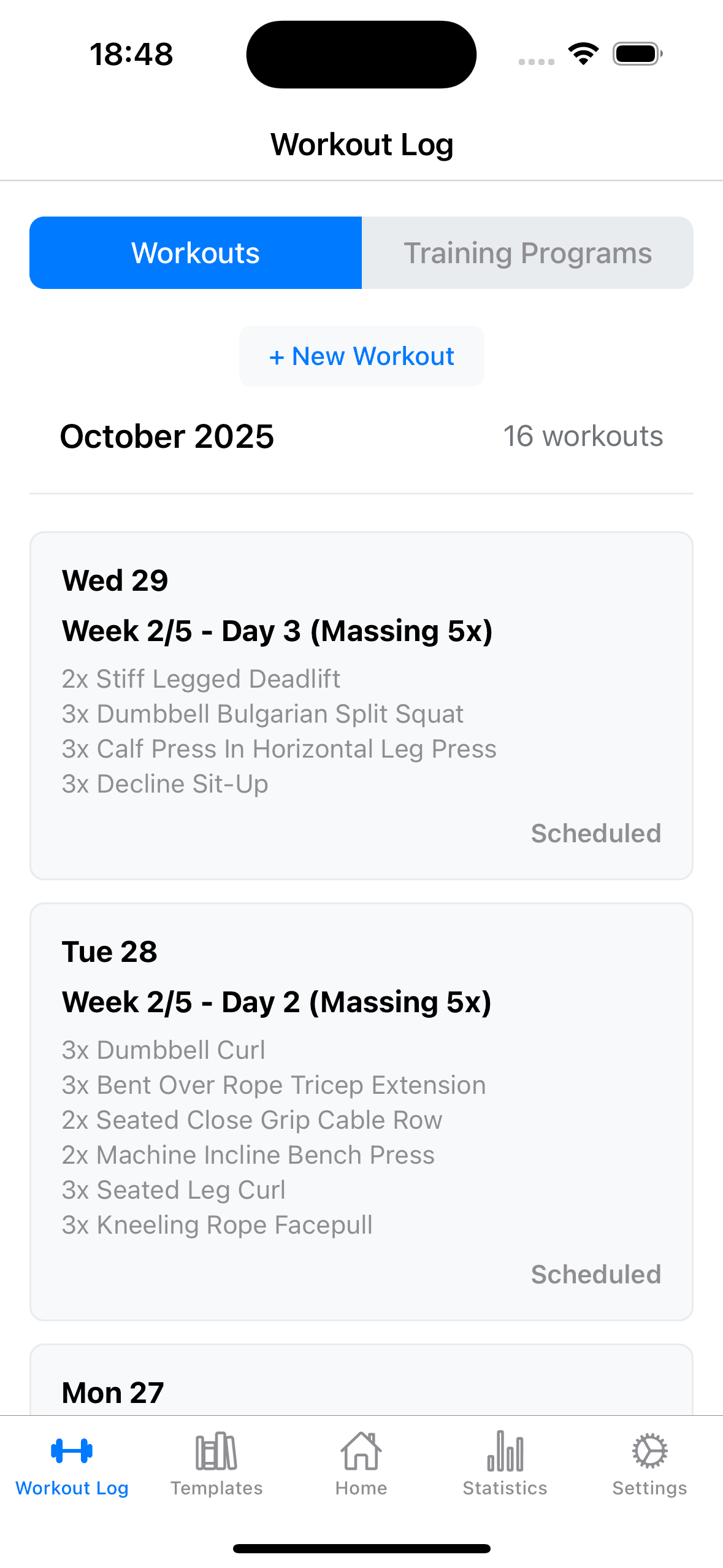
Logging speed: a set is a couple of taps, and last session's weight and reps are on screen before you start. Adaptive progression: after every session GainsLog evaluates your performance and sets targets for the next one. Hit your rep target, the weight goes up. Miss it, you keep the load and push for more reps. That's the core loop, and it works on the free tier.
Free tier: unlimited workouts, no caps, no ads. Premium adds structured programs and deeper analytics, but the loop that drives progress doesn't require it. Data: synced so it isn't trapped on one phone.
Download a few apps and test them against the questions in this article. You'll end up with the right one for you. If that's GainsLog, great. If it's not, at least you'll have chosen it with your eyes open, which is more than most people do.